Unicode to Preeti Converter
Convert Nepali Unicode text to traditional Preeti, Kantipur, Sagarmatha fonts instantly.
Supported Legacy Fonts: Preeti Kantipur Sagarmatha Kanchan Himal Everest Ananda Ganess
Manual input Nepali Font Characters :
Example :+++++ =
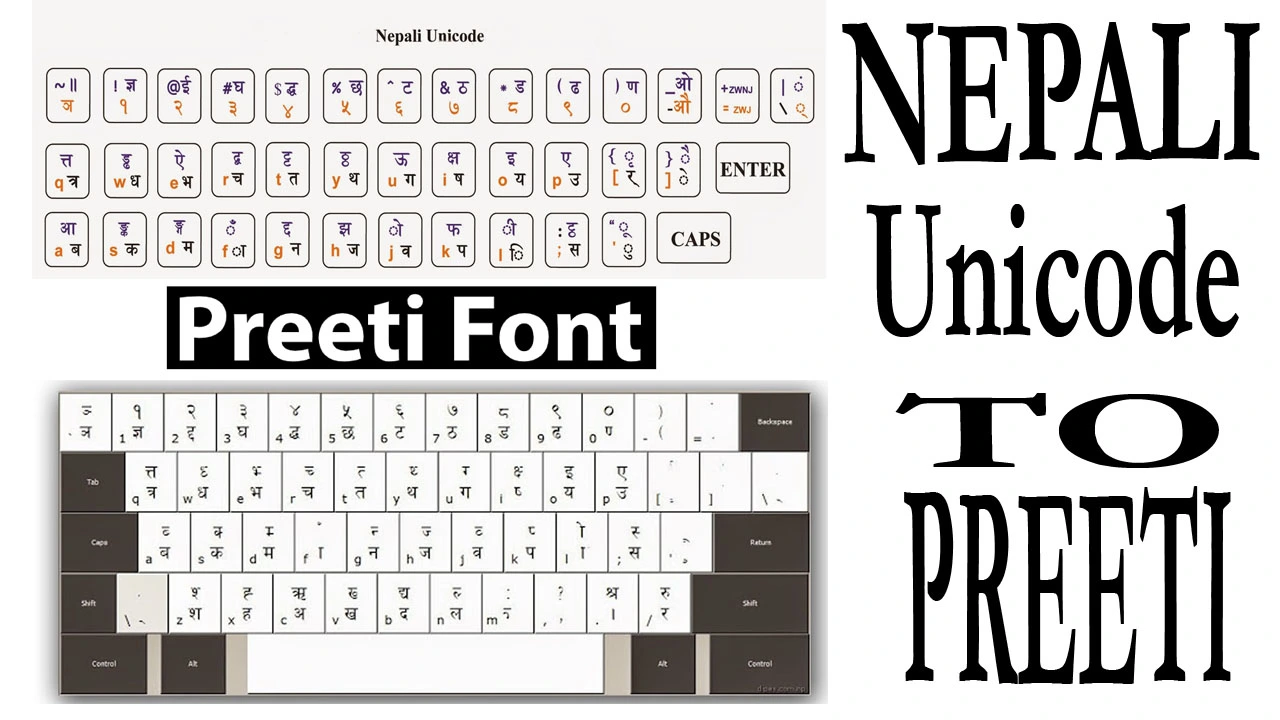
Unicode to Preeti Font Converter
This free online Unicode to Preeti font converter instantly transforms modern Nepali Unicode text into traditional Preeti font format. It also supports conversion to other popular Nepali legacy fonts including Kantipur, Sagarmatha, Kanchan, Himal, Everest, Ananda, and Ganess - which are still widely used in Nepali publications and government offices.
The converter is essential for anyone working with legacy Nepali systems, government documents, or publications that require Preeti format. Simply type or paste your Nepali Unicode text, and get instant Preeti font output ready for copying into your documents.
How to Use Unicode to Preeti Converter
-
Prepare Your Unicode Text
Type or copy Nepali Unicode text from any source (website, document, email) -
Paste into Converter
Paste the Unicode text into the "Nepali Unicode Input" box above -
Automatic Conversion
The text instantly converts to Preeti format in the output box -
Copy & Use
Click "COPY CONVERTED TEXT" and paste into your document with Preeti font installed
Why Convert Unicode to Preeti?
Government Requirements
Many Nepali government offices still require documents in Preeti font format for official correspondence and applications.
Legacy Publications
Nepali newspapers, magazines, and publishers that started before Unicode adoption still use Preeti and similar fonts.
Old System Compatibility
Many organizations still use legacy software systems that only support Preeti font, requiring Unicode conversion.
Who Uses This Tool?
Government Employees
Preparing official documents, letters, and applications for government offices
Publishers & Printers
Converting modern content for publication in legacy newspaper and magazine formats
Academic Institutions
Creating exam papers, certificates, and academic materials in traditional font formats
Corporate Offices
Businesses with legacy systems requiring Preeti format for internal documentation
Unicode to Preeti Converter – Convert Modern Devanagari to Legacy Fonts
The Unicode to Preeti Converter is a vital utility for professionals in Nepal who need to transition text from modern digital standards back into traditional legacy formats. While Nepali Unicode is the standard for the internet and mobile typing, Preeti font remains the requirement for many government offices, legal documents, and professional printing presses. This tool ensures that your Unicode text is accurately re-mapped to the Preeti layout without losing the integrity of complex Devanagari characters.
Why Convert Unicode back to Preeti?
Most people today type in Nepali Unicode because it is easy and available on every smartphone. However, legacy software used in official government documentation and traditional newspapers often requires non-Unicode fonts. By using our Unicode to Preeti tool, you can draft your content anywhere and instantly convert it into a format that is compatible with standard Nepali office software and legacy systems.
Essential Tool for the Printing and Design Industry
Graphic designers in Nepal frequently use Adobe Photoshop, Illustrator, and InDesign for layout work. Many high-quality Nepali fonts are built on the Preeti layout. If a client provides text in Unicode, our Unicode to Preeti converter allows designers to quickly prepare that text for professional design software, maintaining the visual aesthetics required for magazines, posters, and book publishing.
Official Documentation and Legal Forms
In many district offices and Malpot (Land Revenue) offices across Nepal, official forms are still formatted in Preeti. If you have prepared a legal draft or a report in Unicode, you must convert it to Preeti font before printing to ensure it fits the standardized templates. This tool handles samyukta akshars (half-letters) perfectly, ensuring your legal documents are professional and error-free.
Prepare Reports for Lok Sewa and Government Tasks
Government employees and Lok Sewa Aayog candidates often face situations where they must submit reports in traditional fonts. Our online font converter serves as a reliable bridge. It allows you to use the convenience of modern typing while meeting the traditional font requirements of the Nepali administrative system, saving you from the hassle of re-typing entire documents manually.
Accuracy in Complex Devanagari Mapping
Converting from Unicode to a legacy font is technically difficult because of how characters are layered. Our Unicode to Preeti algorithm is optimized to handle the most difficult combinations of vowels and consonants. This ensures that "Ikar," "Ukar," and "Reph" placements are 100% accurate, providing a high-fidelity conversion that requires minimal post-editing.
Instant, Secure, and Mobile-Friendly
Our Online Unicode to Preeti Converter is completely browser-based and secure. Since the conversion happens locally on your device, your sensitive documents are never uploaded to a server. It is fully mobile-responsive, allowing you to convert messages from your phone into Preeti text for professional use, making it the most efficient Nepali typography tool available online.
BARALA Web Tools & Services
Explore our most popular Nepali calculators, typography converters, and daily web utilities.
Frequently Asked Questions - Nepali Unicode
Frequently Asked Questions About Unicode to Preeti ConversionGet answers to common questions about converting Nepali Unicode to traditional fonts
Unicode (Modern)
- Universal standard works everywhere
- No font installation needed
- Standard for websites and modern apps
- Supports all languages in one system
Preeti (Legacy)
- Nepali-specific font system
- Requires font installation
- Used in old government systems
- Traditional Nepali publications
Simple analogy: Unicode is like universal electricity (works everywhere), while Preeti is like a specific type of plug (needs adapter for modern devices).
Many Nepali government departments still operate on legacy systems that only support Preeti font:
Common Departments:
- District Administration Offices (citizenship, passports)
- Land Revenue Offices (property documents)
- Court Registries (legal documents)
- Municipal Offices (local governance)
Document Types:
- Official correspondence letters
- Application forms (citizenship, passport)
- Property registration documents
- Legal notices and court submissions
Simple 4-Step Installation:
-
Download Preeti Font
Get the font file from our Preeti Font Download page -
Extract the ZIP file
Right-click the downloaded file and select "Extract All" -
Install on Windows
Right-click the .ttf file → Select "Install" or "Install for all users" -
Restart Applications
Close and reopen Word, Publisher, or other software to use the font
Windows Users:
Font installation is permanent and works across all Microsoft Office applications.
Mobile Users:
Use apps like "Font Studio" or "iFont" to install custom fonts on Android devices.
Yes! We offer a complete bidirectional conversion solution:
Unicode → Preeti
Convert modern text for legacy systems:
- Government document preparation
- Legacy publication formatting
- Old software compatibility
Current Page: You're already here!
Preeti → Unicode
Convert legacy documents to modern format:
- Digitizing old documents
- Website content creation
- Modern app compatibility
Our converter supports all major traditional Nepali fonts used in different sectors:
| Font Name | Commonly Used In | Primary Use | Download |
|---|---|---|---|
| Preeti | Government offices | Official documents | Download |
| Kantipur | Newspapers | Print media | Download |
| Sagarmatha | Publications | Books & magazines | Download |
| Himali | Educational | School textbooks | Download |
| Kanchan | Business | Corporate documents | Download |
Special Character Conversion Guide:
Common Symbols
।(Purna viram) → Converts automatically॥(Deergha viram) → Converts automatically₹ ₹(Rupee symbol) → May need adjustment०-९(Numbers) → Perfect conversion
Complex Characters
त्र(Tra) → Perfect conversionक्ष(Ksha) → Perfect conversionज्ञ(Gya) → Perfect conversion- Compound letters → 95% accuracy
Troubleshooting Tips:
- If a character doesn't convert properly, try typing it separately
- For rare symbols, use the manual character buttons above
- Check font installation if symbols appear as boxes
- Use "Clear" and reconvert if issues persist
Document Size Guidelines:
15,000
Characters per conversion
Recommended50,000
Characters maximum
Large DocumentFor Books & Large Documents:
- Chapter-by-Chapter: Convert one chapter at a time
- Save Incrementally: Copy converted sections to Word
- Use Sections: Divide by headings or page breaks
- Batch Processing: For novels, convert 10-20 pages per batch
Pro Tip
For entire books (80,000+ characters), use our Batch Converter Tool designed for publishers and large-scale conversions.
Related Search Topics & Usage
Publishing & Design
The preferred tool for graphic designers converting Unicode text for Adobe Photoshop and InDesign. Perfect for newspaper layouts and book printing in Nepal.
Administrative Work
Essential for government document formatting, legal drafting, and official letters where Preeti font is the mandatory standard for record-keeping.
Common User Queries
Users often search for "how to convert Unicode to Preeti", "Devanagari to legacy font converter", "Unicode to Preeti converter for Mac", and "best Nepali font converter for designers".